
MCPs: Connecting Capabilities and Toolsets
For most of AI's early consumer era, the models themselves were the product. Increasingly capable, increasingly fluent, but fundamentally isolated — clever assistants living in a chat window, cut off from the systems and data that make up the rest of your digital life.
The Model Context Protocol changes that. It's one of the more quietly significant developments in how AI actually works in practice — not a new model, not a new interface, but a new standard for connection. And once you've used it, the old way of working feels unnecessarily constrained.
What Is MCP?
The Model Context Protocol (MCP) is an open standard introduced by Anthropic in November 2024. The problem it solves is elegantly described: before MCP, connecting AI models to external tools and data sources required custom integrations for every combination of model and service. If you had ten tools and five AI platforms, you needed up to fifty separate connectors. Every integration was bespoke. Every one needed maintaining.
MCP replaces that with a single standard — a universal language that any AI model can use to communicate with any external system that speaks the same protocol. Build an MCP server once, and it works with Claude, ChatGPT, Gemini, Cursor, and any other client that supports the standard. The N×M integration problem collapses into something manageable.
The architecture has three parts. The host is the AI application the user interacts with — Claude Desktop, a coding environment, a custom agent. The client sits inside the host and handles communication with external servers. The server is the external capability being connected — a database, a smart home system, a code repository, a web browser. The model discovers what tools a server exposes, decides which ones are relevant to a task, and calls them as needed. The user stays in control — Claude asks for permission before invoking any tool.
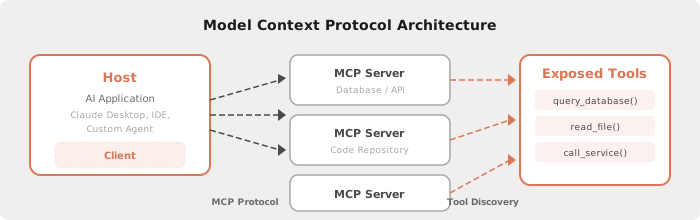
In December 2025, Anthropic donated MCP to the Agentic AI Foundation under the Linux Foundation, co-founded with Block and OpenAI. The protocol is now genuinely open and vendor-neutral, with SDKs available in Python, TypeScript, C#, and Java. OpenAI adopted it in March 2025. Google DeepMind followed. What started as an Anthropic initiative has become the closest thing the AI industry has to a shared integration standard.
Why It Matters
The practical implication of MCP is that AI models stop being isolated and start being connected. Instead of copying and pasting content between systems, or re-explaining context that already exists somewhere else, the model can reach directly into the systems where your work actually lives.
A coding agent connected to your repository understands the codebase it's working on. An AI assistant connected to your calendar and email understands what you're working on this week. An AI connected to your smart home knows the state of every device in it.
This isn't just about convenience. It changes the quality of the work. A model with live context from the relevant systems produces better, more accurate, more actionable output than one working from a description you've typed into a chat window. The connection is the capability.
How MCP Servers Are Deployed
One of the things that makes MCP genuinely accessible — not just in theory but in practice — is how servers can be deployed. The most common approach is Docker: containerised images that can be pulled and run with a single command. No complex installation. No dependency management. No configuration that differs between machines.
This means that running an MCP server doesn't require a cloud account, a server farm, or any particular technical infrastructure. It can run on your MacBook. It can run on a home server. And increasingly, it can run on a home NAS device — the kind of always-on, low-power network storage boxes that many people already have sitting on their network.
Synology, QNAP, and similar NAS devices support Docker either natively or through Container Manager. Spinning up an MCP server on a NAS is a matter of pulling an image and configuring a handful of environment variables. Once it's running, it's always on, always available on your local network, consuming minimal power, and requiring no ongoing maintenance.
For anyone who wants the capability of a connected AI without handing data to a third-party cloud service, this is a compelling setup. Your data stays on your network. Your tools stay under your control.
Connecting Claude to Home Assistant
Home Assistant is the open-source home automation platform that has become the go-to choice for anyone who wants serious control over their smart home without locking into a proprietary ecosystem. It runs locally, supports thousands of devices and integrations, and gives you full visibility and control over everything connected to it.
The gap between Home Assistant and AI has always been the interface. You could build automations through the UI, write YAML directly, or use the voice assistant — but none of these felt like genuinely natural interaction with the system. You were always translating what you wanted into the language the tool understood.
MCP closes that gap. With a Home Assistant MCP server running — either as a Docker container on your network or as a native integration built into Home Assistant since version 2025.2 — Claude Desktop gains direct, live access to your entire smart home. It can read the current state of every entity, call any service, create automations, build dashboards, and query usage patterns. It understands your home's structure the same way it understands a codebase it's been given access to.
The practical effect of this is difficult to overstate. The wish list of improvements and ideas that accumulates over time — the automations you keep meaning to build, the dashboard layouts you've imagined, the logic you've wanted to implement — suddenly becomes executable in conversation. You describe what you want in plain language. Claude reads the live state of your system, understands what entities and services are available, and builds it.
Automations that would have taken an hour of YAML editing get produced in minutes. Dashboard layouts that required careful manual arrangement get generated and configured directly. Device groupings, scenes, schedules, conditional logic — all of it becomes conversational rather than procedural.
There's also a less obvious benefit: the diagnostic and analytical work that Home Assistant makes possible but rarely gets done. With Claude connected, you can ask things like "which automations have overlapping triggers?", "what's consuming the most energy overnight?", or "which entities haven't updated in the last 24 hours?" — and get back genuine analysis rather than a prompt to go look through the logs yourself.
The Broader Picture
The Home Assistant use case is vivid precisely because Home Assistant is a complex, live system with real state — and connecting it to an AI that can read and act on that state produces tangible, immediate results. But it's just one example of what MCP makes possible.
The same pattern applies across any domain where you have data, tools, or systems that could benefit from AI reasoning applied to live context. Code repositories where an AI coding agent has genuine understanding of the project. Databases where a model can query and analyse directly. Business tools where context doesn't have to be copied into a chat window before work can begin.
MCP is, at its core, a bet on a particular vision of how AI should work — not as an isolated assistant you consult, but as a participant in the systems where work actually happens. The early evidence from deploying it is that the bet is paying off. Connected AI is meaningfully more capable than isolated AI, not because the model has changed, but because it finally has access to the context it needs.
The containerised deployment model makes this accessible to anyone willing to spend an afternoon on the initial setup. After that, it runs quietly in the background — and the gap between what you want to do and what you can actually do narrows considerably.
Posted by Envision8 · envision8.com